

So, you’ve got Magento running with Varnish. Theoretically, it should be fast. But it’s not. You sit down to investigate the mess:
- You load a product. It takes forever. 🐢
- You refresh the same page. It flies. Great, Varnish is working! 👏
- You go grab a coffee, come back 10 minutes later, and load it again. 2-second TTFB! Fuck! It was cached just a second ago!
If this sounds familiar and you’re one step away from throwing your server out the window, this extension is for you 👉 Keep reading.
What the hell is happening with your Full Page Cache?
Let’s be honest: native Magento cache management is like “organizing” your room by throwing everything on the desk into the trash because “it’s faster that way.” 🧹
What’s happening is that Magento prioritizes having data “instantly” updated for the user. Let me explain…
Imagine your entire store (home, categories, products…) is perfectly cached. The site is blazing fast, and your Core Web Vitals are all green. But suddenly, you go to the backoffice and change a static block in the footer to update the copyright year, which was stuck in 2018 (a classic). You set it to 2026 📅, hit save, and boom! The server fans start sounding like a Boeing 747 taking off. The web crawls, and the customer service team collapses your Slack because generating a shipment takes longer than the development of GTA VI. 🎮
What happened? The Mass Invalidation Drama 💣
Magento did exactly what it was told to do. Magento is smart (sometimes), but it’s a drama queen. It knows that footer block appears on EVERY page and, since its motto is “I’d rather be dead than outdated,” it triggers a mass cache purge of every single URL containing that block. Result: your entire store goes down the toilet in a second. 🚽
- Is it correct? 👉 Yes.
- Is it optimal? Less than trying to put out a forest fire with a water pistol. 🔫🔥
Want more examples? Here we go… When an order comes in, stock changes. Maybe the product is now out of stock and the “Add to Cart” button needs to go, or maybe it shows 232 units but I actually only have 231 left. Magento enters nuclear panic: “Oh, really? Fine, I’ll delete the product page, the ten categories where it appears, and the home page just in case.” 🤯
If you also sync stock with an ERP every 5 minutes… congratulations, your cache is useless. Your TTFB will jump from 300ms to 3 seconds because the CPU is more stressed than a developer on a Friday at 5:00 PM. 😫
But isn’t being “up to date” what we want?
Well, yeah, obviously. But invalidating the entire cache just because a copyright year changed isn’t exactly peak engineering. We want everything updated, but there are better ways to do it.
The main problem is that Magento invalidates the cache of a product (or a thousand) and that product stays out of the cache until another user visits it… meaning your users are the ones paying the “regeneration tax” for that page.
Okay, you convinced me… how do we fix the performance? 🛠️
The secret to a fast online store isn’t just invalidating (deleting), but regenerating.
If a product changes, don’t just delete it and wait for some poor user to eat a 2-second load time. Delete it and regenerate it yourself in the background. That way, when the customer arrives, the page is already crisp and ready. This is called Cache Warming (for those who don’t want the technical jargon: pre-heating the oven). 🍞🔥
ByDN Improved Page Cache Features ✨
Admin Monitoring: A grid-style panel to see what’s cooking in the queue, how long it’s taking, and if any process has shat the bed. 📊
Smart Refresh Strategy: It intercepts mass purges and puts them in a queue. No CPU spikes, just law and order. 🎼
Cache Warmer: Warm up the Home, categories, or products whenever you feel like it. Perfect after a deploy or a massive catalog import. ⚡
Priority Management: Important stuff gets refreshed first. What isn’t in the cache yet comes later.
Parallel Processing: You can configure how many pages are regenerated at once. Don’t go crazy; we don’t want to fry the server. 🍳
Installation
You can download it from my GitHub here, but if you’re a decent human being, you’ll do it via Composer:
composer require bydn/improved-page-cache
./bin/magento module:enable Bydn_ImprovedPageCache
./bin/magento setup:upgrade
Configuration
In your backoffice, head over here: Stores => Configuration => AI Extensions (by DN) => Improved Page Cache.
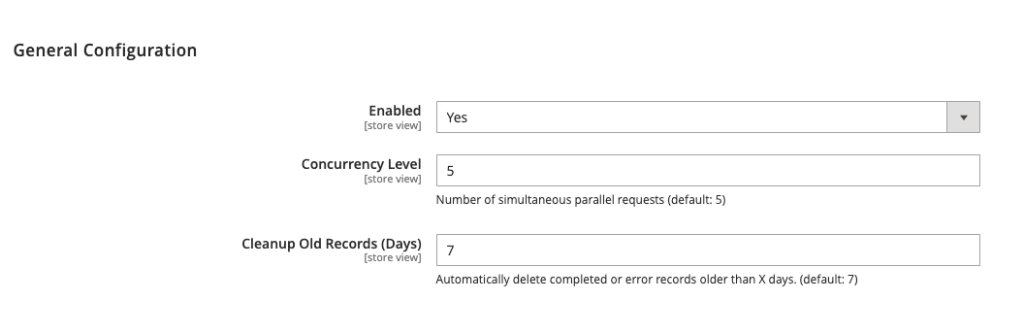
You’ll see there isn’t much to tweak because the extension does almost everything by itself…
- Enabled: This allows you to activate or send the extension to hell (deactivate) entirely.
- Concurrency Level: Set the number of simultaneous parallel requests during the warming process. It’s 5 by default; don’t set it to 50 unless you want your server to start smoking.
- Clean Old Logs (Days): Automatically deletes warming logs older than the specified days (default: 7). Keep the database clean, or don’t complain later that Magento is slow.
Varnish Configuration: The Master Touch 🎩
For this Magento speed boost to be 100% effective, add this to the start of your vcl_recv in Varnish:
if (req.http.X-Magento-Cache-Refresh) {
    set req.hash_always_miss = true;
}
This tells Varnish: “Hey, when this module asks for something, don’t give me the old stuff you have saved; go fetch the fresh version and update it.” No drama. 😎
Console Mode (for those who won’t let go of the keyboard) ⌨️
The extension gives you two main commands to manage the warming queue manually. One to enqueue items, and another to process them (though a cron job already does this every minute).
Enqueuing items: Use bydn:cache:enqueue to shove pages into the pre-heating queue. Here are some examples so you don’t get lost:
- Warm the Home page for store 1:
php bin/magento bydn:cache:enqueue --stores 1 --type home - Warm ALL products for store 1 with max priority (the “anxious” mode):
php bin/magento bydn:cache:enqueue --stores 1 --type products --ids all --priority 5 - Warm specific categories (pass IDs separated by commas and you’re good):
php bin/magento bydn:cache:enqueue --stores 1 --type categories --ids 10,11,12 - Warm a specific URL (just because you feel like it):
php bin/magento bydn:cache:enqueue --stores 1 --type url --url "https://your-store.com/special-page"
Processing the queue: Normally, cron jobs handle this while you’re having a coffee, but if you’re in a hurry and want to fire the process manually:
php bin/magento bydn:cache:warmAnd if you only want to process the important stuff (priority 3 or higher):
php bin/magento bydn:cache:warm --priority 3📊 Admin Monitoring
You can track the warming progress or see pending items at: System => Tools => Cache Warming.
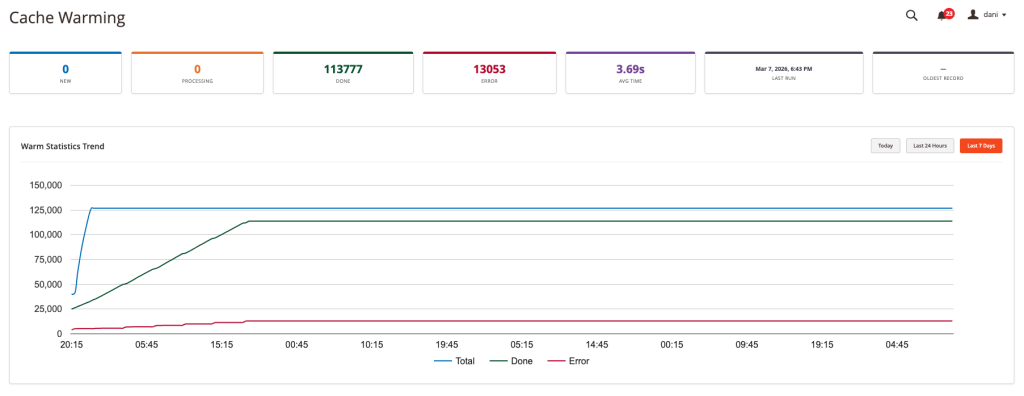
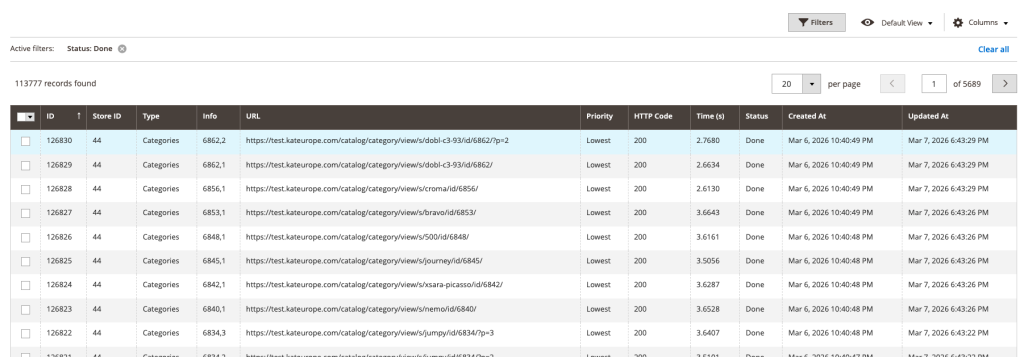
What if something goes wrong? 😩
You can write to me via the contact form. If the problem is interesting and you don’t catch me in the middle of an existential crisis over a CSS bug, I’ll probably get back to you with a fix. 📩
And if you need me to install it, customize it for your online store, or put a gift bow on it because your client is extra demanding… we can also talk business. 💸💼