

Let’s face it: trying to change the email of a processed order in Magento is like trying to convince your grandma that you’re full and don’t want any more soup. Once that order hits the system, that customer_email becomes more sacred than the Coca-Cola secret formula or the recipe for eternal youth.
But of course, there’s always that customer—the one who types their email as if they were bashing the keyboard with a giant sausage—who opens a support ticket: “Hey, I didn’t get my confirmation! Your website is trash!”.
That’s when the support team panics, surrounds your desk with torches, and drops the classic line: “The emails aren’t working! No customers are receiving anything!” 😱.
You, having more war scars than a 90s sysadmin, know that when support says “no customers,” they actually mean: “I have exactly one case, but I’m too lazy to check the mail logs and it’s easier to blame you.” You head to the admin, find the order, and… Surprise! The genius wrote paco70@hotmial.con. 🤡
Since the email field in the Magento admin is more locked down than a Project Manager’s common sense on a Friday afternoon, you’re stuck opening Sequel Ace, praying to the SQL gods, and crossing your fingers that you didn’t forget the WHERE clause—otherwise, you’ll end up setting Paco’s email for all 200,000 orders in the store. 💀
The Solution: ByDN_ChangeOrderEmail 🛠️
Since I got tired of playing Russian roulette with the database via SQL (which is fast, sure, but a bit “cowboy coding,” and you know it), I built a small extension that does exactly what it promises. No fireworks, no infinite configurations, and most importantly, without your server exploding in your face.
You can download it here and stop suffering:
👉 ByDN Magento Change Order Email on GitHub 🚀
What does this thing do?
Basically, it adds an “Edit” button next to the email in the order view. You click it, fix the customer’s mess, save, and you’re done. Magento stays happy, and you avoid the micro-infarct of touching the DB in production.
- Direct Editing: Change the email right from the admin interface (Sales -> Orders). Easy peasy. 👨👩👧👦
- Zero Bloat: It doesn’t clutter your database with weird tables or ghost attributes. It only updates what needs to be updated. ✨
- Free: Because sharing is caring, and because I know you’re going to spend that money on premium coffee (or something stronger to survive the next Adobe security patch). ☕🥃
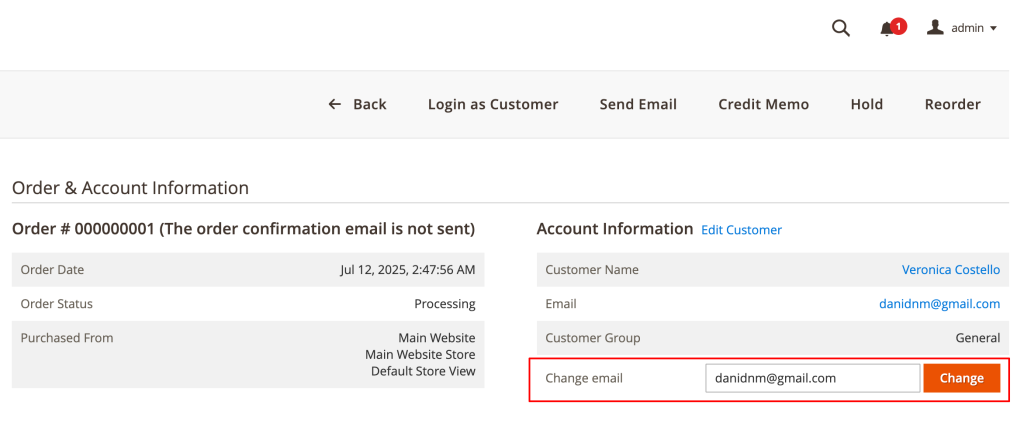
Installation
If you’re still uploading files via FTP, please, it’s 2026—get some help. For everyone else, the usual dance:
composer require bydn/module-change-order-email
php bin/magento setup:upgrade
php bin/magento cache:flush
And if for some mystical reason you don’t use Composer, just download the ZIP, throw it into app/code/ByDN/ChangeOrderEmail, and pray whatever you believe in while running setup:upgrade. 🙏
Configuration
Were you expecting a config panel with 40 tabs? Sorry to disappoint. Install it and you’re good to go. 🏃💨
As for permissions, I’ve applied the “Law of Minimum Effort” (also known as smart reuse): it uses the same permissions as “Edit Order.” If a user is allowed to touch an order, they can fix the email. Simple as that.
Missing something or need a custom fit?
If you like the extension but need it to also send an email to the customer apologizing for their own typo, or if you’ve found a bug so weird that even AI doesn’t know what to do with it… Let’s talk! 🗣️
Hit me up via my contact form. If the challenge is interesting and you don’t catch me in the middle of an existential crisis fighting a z-index issue, I might just get back to you with a solution. 📩
And if you need me to install it, customize it, or put a bow on it because your client is more demanding than a Michelin critic… pull out your wallet and let’s talk business. 💸💼 Man cannot live on code alone!