

There are mornings when you wake up ready to conquer the world, and then Magento—or rather, Composer—gives you a reality check that hits like a bucket of ice water. You aren’t the boss here.
Today I’m sharing one of those horror stories that happens when a client decides “we don’t use this service anymore” but forgets to tell the guy actually writing the code. Spoiler alert: the ending involves cold sweats and Composer demanding things you simply don’t have.
The Drama: Sudden Deployment Explosion
I had one of those “essential” modules (read: someone installed it in 2019 and nobody has looked at it since) sitting in my composer.json. Everything was running smooth until, out of nowhere, the deployment server let out an agonizing scream.
Turns out, access to the private repository had vanished. Apparently, someone stopped paying the subscription because the service was no longer in use, but the module was still there, squatting in your vendor folder like an uninvited guest who won’t leave.
And of course, you run a deploy and… BAM! Error right in the face:
Your GitHub credentials are required to fetch private repository metadata (https://github.com/savvycube/magento-two)

You need to provide a GitHub access token.
...
My terminal history looked like a bar fight. Me trying to get in, and GitHub asking for my ID, blood type, and an access token for an account that no longer exists. Lovely.
The Failed Attempt: “Composer, get this trash off me”
After talking to eight different people (including the maintenance guy who just happened to be passing by) to confirm that, yes, we didn’t want that garbage module for anything, I proceeded to delete it with the moral superiority of someone who knows their way around a terminal:
danielnavarro@MacBook-Pro-de-Daniel src % composer remove savvycube/magento-twoAnd this is where Composer goes into “toxic ex” mode. It won’t let you leave, but it won’t let you stay either:
savvycube/magento-two is not required in your composer.json and has not been removed

./composer.json has been updated

Running composer update savvycube/magento-two

Loading composer repositories with package information

Package "savvycube/magento-two" listed for update is not locked.

Your GitHub credentials are required to fetch private repository metadata (https://github.com/savvycube/magento-two)
Wait, seriously? Do I really need an access token just to REMOVE a module? Apparently, yes. Composer tries to update the “state of the world,” and since it can’t read the repo it’s supposed to say goodbye to, it enters an infinite loop of despair.
The Solution: Open-Heart Surgery (No Anesthesia)
If the front door (the remove command) is locked and bolted, you’ve got to climb in through the window.
Since Composer was being stubborn, I had no choice but to go wild: manually editing the composer.json. Yeah, that thing they tell you never to do unless you know exactly what you’re touching. Well, today, we’re touching it.
I hunted down those cursed lines and deleted them with the heat of a thousand suns:
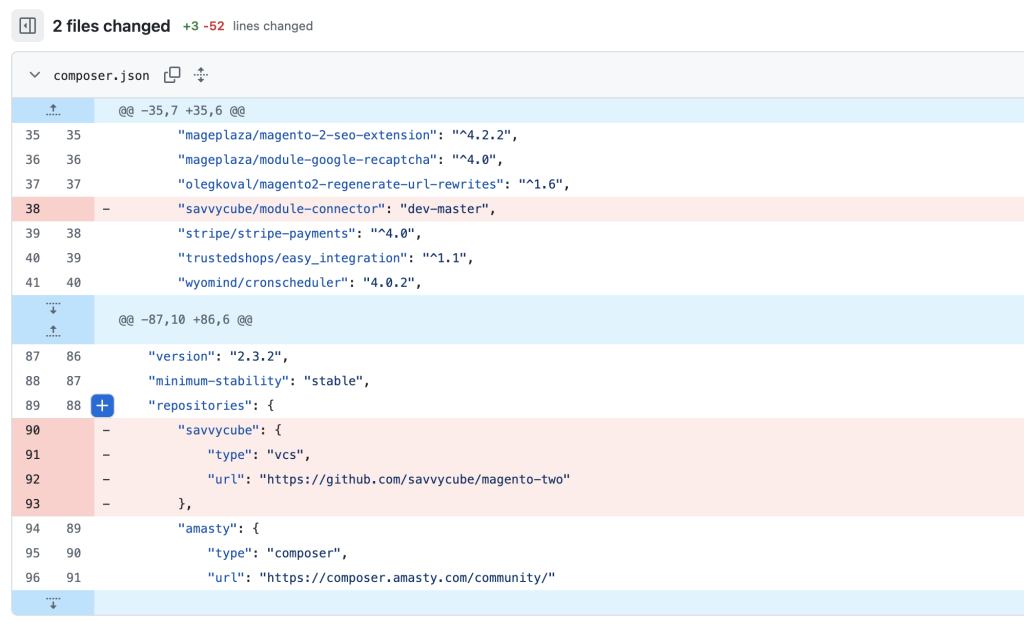
“Is that it?” – Asked the optimist
Not quite, you innocent soul. If you run a composer update now, you risk updating 40 other Magento modules you didn’t want to touch, and the store might start throwing fireworks (the kind that burn the building down).
The pro move here is:
composer install“But… doesn’t that just pull from the composer.lock?” – you might ask with a furrowed brow.
Well, yes and no. When you manually delete a line from composer.json and run composer install, the system detects that the .json and the .lock are out of sync. Seeing that a module is missing from the requirements, it wipes it from the .lock and nukes it from your vendor folder without touching a single version of your other packages.
Panic deactivated. Crisis averted.
So now you know: if a module tries to act all dignified and won’t let you leave, erase its fingerprints from the JSON and act like it never existed. It’s cold, but in web development, there’s no room for feelings.

So, what do you think ?