

🚀 The Modern Password Paradox
We live in an age where everything has to be instant: the site loads in 100 ms, scrolling is smooth as butter, and users expect to be logged in before they even finish typing their email.
So, as developers, we obsess over reducing TTFB, we do cache acrobatics, and shave off milliseconds from response times like our professional dignity depended on it.
And then… there’s the login.
That’s the one place where your web or app should take its sweet time. And not because of laziness or sloppy code. Quite the opposite.
Sometimes, if your login is lightning fast, you should be hearing this in your head:
🚨 Wait… is this actually implemented correctly?
🚨 Are we hashing with something slow and secure like bcrypt or Argon2?
🚨 Or did someone get nostalgic and throw in a good ol’ MD5 from the 2000s?
Yep, here’s the paradox: fast apps are great. But logins that are too fast can be a red flag. Because in the real world, a solid login needs to spend a few precious milliseconds (or even seconds) doing the dirty work: comparing hashes, salting passwords, and using intentionally slow hashing algorithms to fend off brute-force attacks.
It might annoy the impatient user, sure… But it could save you from a legendary mess.
The kind that ends in headlines or mass emails starting with “We regret to inform you about a potential data breach…”
Let’s break it down.
🛠 First Things First: How Should Passwords Be Stored? (Spoiler: they shouldn’t.)
Let’s go back to basics — it’s never a bad idea: Passwords should never be stored.
Let me repeat: NE-VER STO-RED.
Not in the DB, not in a post-it, not in an env var, and for the love of tech gods, not in an Excel file on your desktop named clients_2025_FINAL_FINAL2.xlsx.
❌ Don’t store passwords. Period.
“Okay but… how the hell does the app know if the password is correct then?”
What gets stored is a hash. And no, that’s not just a fancy new name for a password. It’s something else entirely.
🔐 So, What’s a Hash?
A hash is the result of applying a mathematical function to a string (in this case, a password). The cool part?
- The same input always gives the same output.
- You can’t reverse it. You can hash a password, but you can’t “unhash” it (in theory — unless you’re the FBI with a quantum computer).
- Tiny changes in the input = totally different output.
Example:
hash("solodani123") → a21c8d4e5f4b7“Wait wait wait… so when I type my password, how does the app check it’s right?”
Easy.
In your database, you’ll store this:
| user | password_hash |
| dani | a21c8d4e5f4b7 |
| julieta | f8783hu7374nf |
When you type dani and solodani123 in the login fields, the app hashes the password again, gets the same string, and compares it with the stored one.
If it matches: 🎉 You’re in.
If it doesn’t: ❌ Bye.
And all that without ever storing the real password. Neat, huh?
Well… that’s just the beginning 😏
🤔 “Okay but what do you mean it can’t be reversed?”
Let’s illustrate this with a painfully realistic example:
Imagine your cousin’s kid is now a self-proclaimed developer and thinks he’s Linus Torvalds. Instead of using bcrypt like a normal human, he invents his own “super secure” algorithm, because “if everyone knows how bcrypt works, it can’t be safe.”
So he writes this:
function hash(password) {
  let sum = 0;
  for (let i = 0; i < password.length; i++) {
    if (i % 2 === 0) {
      sum += parseInt(password[i]);
    }
  }
  return sum;
}
What it does: adds up the digits in even positions (assuming numeric passwords).
So:
| Password | Even positions | Hash (sum of even positions) |
| 1111 | 1,1 | 2 |
| 1210 | 2,0 | 2 |
| 2193 | 1,3 | 4 |
Voilà. A unique, fast, simple hashing algorithm… as secure as a paper door.
You’re starting to see the problem, right?
- Multiple passwords produce the same hash.
- Tons of info is lost in the process.
So even if someone steals your DB, they won’t get the actual passwords — just the hash. But…
Let’s test your cousin’s system:
If your type 1111, you can log in. Great!
But guess what? You can also log in with 1210.
And 2131.
And 2121.
And 3131… and so on.
👉 That’s why you don’t roll your own crypto.
Not even after reading this post. Not even if you’re feeling clever in the shower.
Use bcrypt, scrypt, or Argon2. They’ve been tested, reviewed, audited, and battle-hardened.
If someone tells you “bcrypt isn’t safe because everyone knows how it works,” do this: Close your laptop, take a deep breath, revoke their prod access…
💣 So How Do Passwords Get Cracked?
At its core, password cracking is pretty basic:
Grab a wordlist (aka “dictionary”) and test entries one by one.
If your user is one of those “meh, I’ve got nothing to hide” types who uses 123456 or password123, it’s game over fast.
But if your password is one of the good ones — you know, with letters, numbers, uppercase, and those annoying special characters the system makes you add — it’ll probably take them a lot longer.
And here’s where a slow login saves your bacon.
Because bots — not humans — are testing those passwords. And bots are fast. Like really fast.
So if your login responds at the speed of light… You’re basically inviting a brute-force fiesta. 🎉
👉 The fix?
Add intentional delays. Yes. On purpose. Seriously.
And if that delay is random, even better. (It protects against timing attacks. More here.)
👾 Wait… What Do Hashes Have to Do With It?
Ah! You’ve been paying attention. Nice.
Let’s walk further into this rabbit hole.
🕵️♂️ How Attackers Might Hijack Your Users’ Facebook Accounts
Let’s say your site is booming with 1 million users.
In your DB you store this:
| user | password_hash (MD5) |
| soy@solodani.com | e10adc3949ba59abbe56e057f20f883e |
| someone@gmail.com | 482c811da5d5b4bc6d497ffa98491e38 |
All good, right? You hashed the passwords. Relax.
Except…
- You used MD5 (which is deader than Flash).
- You didn’t use salts (more on this post 👉 The salt and pepper of passwords).
- Your server hasn’t been updated in months. Because you’ll do “tomorrow”.
- Your DB password is still
changethisfrom your.envfile.
What could go wrong? 😎
Answer: everything.
Now a hacker — not even a smart one — gets access to your DB and grabs the user/password_hash table.
But hey, it’s hashed! All good! …Right?
😬 Not so fast.
Go to 👉 https://md5decrypt.net
Paste in that hash (e10adc3949ba59abbe56e057f20f883e) and hit “Decrypt”.
💥 Boom.
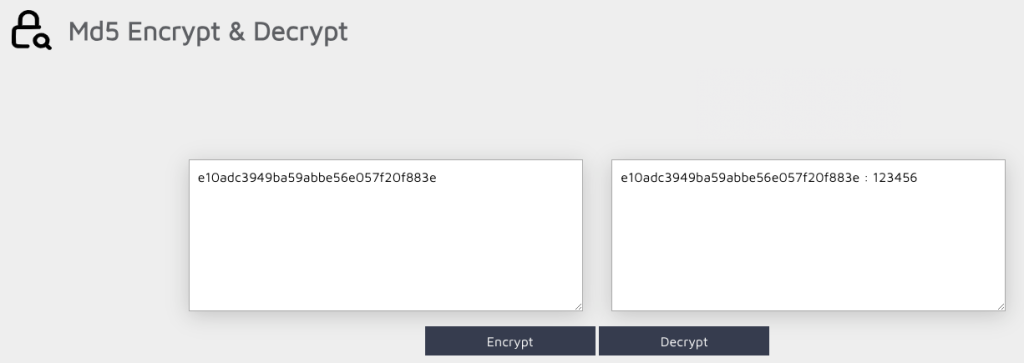
Plain text password in seconds.
Now imagine your user reused that password on Facebook. Guess who’s got access to their Facebook account?
😱 WTF! Aren’t Hashes Supposed to Be Irreversible?
They are. I didn’t lie. Promise.
But hackers aren’t your cousin’s kid. They’re smart. Like, really smart.
They precompute hashes of millions of common passwords and match those against stolen hashes. It’s called a rainbow table.
And since we humans are lazy and reuse passwords like maniacs…
💥 One breach = multiple accounts compromised.
🔐 Password Advice for Your Users
🔁 Never reuse passwords. If one site leaks your hash, you’re toast on every other site using the same password.
Use a password manager. You won’t remember 50 strong passwords. And post-its are not the answer.
Always enable 2FA. It’ll save your butt if your password gets leaked.
Stop using “verano2025” as your password.
Don’t use security questions if the answer is on your Instagram.
“What’s my pet’s name?” → your last 50 posts.
Check if your email was in a breach:
👉 https://haveibeenpwned.com
Never share passwords via email.
Not your bank. Not Netflix. Not the Nigerian prince.
🧑💻 Okay… So How Should You Build a Login?
Glad you asked. Here’s your dev tattoo checklist (or README.md, your call):
🔐 Never store passwords. Store hashes.
And no, MD5 doesn’t count. Neither does SHA1. SHA256 without salt? Still nope. Use bcrypt, scrypt, or Argon2.
They’re slow — and that’s the whole point.
🧂 Always use salt.
A random salt, unique per user. That way, even if two people have the same password, the hashes will be different.
And rainbow tables? Let them go fry monkeys 🐒.
Yeah, yeah, I know — I haven’t explained what salt is in a hash. But this post is already long enough. I’m covering on this post 👉 The salt and pepper of passwords
🌶️ If you can, add pepper.
A secret value, fixed and stored outside the database (in your config, env file, etc).
It’s just another little bump in the road for anyone who steals your DB.
Haven’t explained this one either — it’s kinda like salt. More info 👉 The salt and pepper of passwords
🚫 Don’t invent your own hash algorithm.
Ever. Never. Not even if you came up with a “brilliant idea” in the shower.
Stick to public, reviewed, audited, battle-tested algorithms.
🧠 Make the login process intentionally slow.
Yep, you read that right: add delays.
Don’t let bots hammer your system with thousands of attempts per second. And if you can, make that delay random — protect yourself from timing attacks.
🔐 Apply 2FA if you can (and don’t limit it to just admins).
Even if your login is Fort Knox, passwords can still get leaked on other sites with crappy security.
And when that happens, only 2FA stands between your users and disaster.
📈 Log login attempts (but never the passwords).
You need traceability. Know if someone fails 20 times in 2 minutes.
But never log what password was tried. Never.
🔐 Apply rate-limiting on the login endpoint.
Yes, even if you’ve got CAPTCHA.
Throttle by IP, by account, by cookie… whatever works. Just put a limit.
👀 Never leak extra info in error messages.
Saying “User not found” or “Incorrect password” helps attackers a lot.
Stick with a generic error: “Invalid credentials.” Full stop.
🧪 Test your login like you’re trying to break it.
Try weird passwords, emojis, injection attempts…
If you’re not trying to break it, someone else will.
🤖 Add CAPTCHA (but use your head)
It won’t save you from everything, but it slows down dumb bots that blindly hammer your login form.
- Use it after a few failed attempts, so you don’t ruin the UX from the start.
- If possible, use reCAPTCHA v3 or something invisible — less friction, same effect.
- If it’s a visible one, make sure it works on mobile and isn’t a UX nightmare.
CAPTCHA won’t stop the pros, but it’s a decent trap to catch the clumsy ones.

So, what do you think ?