

Freshly poured coffee in hand, 10:00 AM on a random Tuesday, and my phone buzzes. It’s a dev buddy of mine, utterly crushed, dropping a screenshot that reeked of pure technical despair.
He’d spent the last three hours banging his head against the desk trying to make a basic REST API call to Magento 2. Magento’s response? An open-handed slap right across the face:
{
  "message": "The consumer isn't authorized to access %resources.",
  "parameters": {
    "resources": "Magento_Catalog::products"
  }
}
So far, just another regular day in the wonderfully masochistic world of Magento. The error wasn’t the scary part; the terrifying part was the rabbit hole he fell into after consulting his beloved AI.
(Spoiler: He was two minutes away from taking a sledgehammer to Apache and PHP-FPM in production, all thanks to a theoretical hallucination).
🕵️♂️ The AI Report: Cracking a Nut with a Sledgehammer
The guy did what any of us do when an endpoint gets stubborn: he fed the error to the AI. And the AI—delivering answers with the kind of cocky confidence usually reserved for overpriced consultants in tailored suits—spun up a Hollywood-level conspiracy thriller:
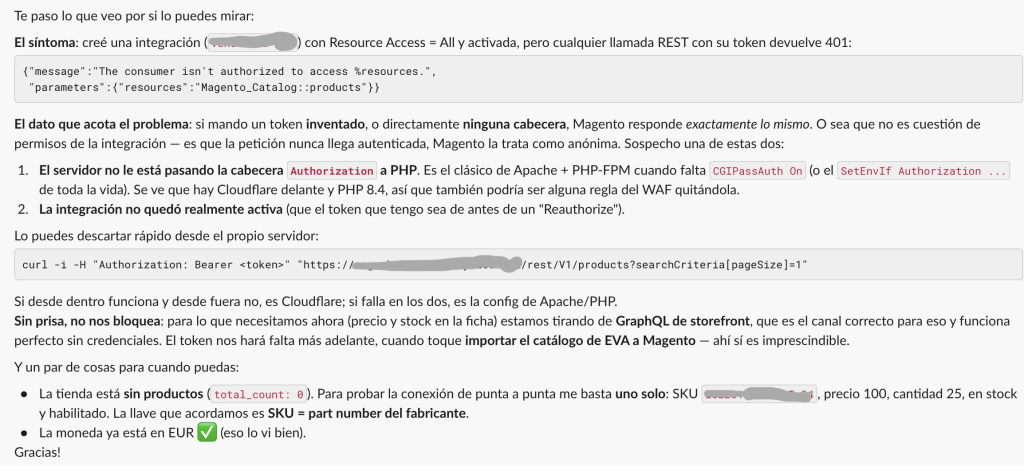
- “Apache isn’t forwarding the
Authorizationheader to PHP-FPM, so you must slapCGIPassAuth Onor tweak yourSetEnvIfdirectives”. - “Cloudflare WAF rules are probably stripping the headers mid-flight”.
- “PHP 8.4 woke up on the wrong side of the bed today, so you need to overhaul your FPM pool config”.
Look at that conviction. The prose looked spotless, loaded with serious-sounding DevOps jargon. If you don’t have battle scars in this stack, you take the bait. You open your terminal, pull up httpd.conf or .htaccess, start blindly tweaking web server directives, bounce services… and boom: you’ve just punched a gaping security hole in your setup or brought down the whole storefront in the name of “troubleshooting.”
The real issue?
The AI didn’t have the faintest clue how Magento 2 actually handles integration security.
🤦♂️ The Switch the AI Completely Ignored
For quite a few versions now (thanks to Adobe’s trademark security paranoia—acting like your mother forcing you to wear a sweater in the middle of August), Magento 2 ships with standalone Bearer token authentication disabled by default.
Period. No Apache nonsense, no Cloudflare drama, no gremlins inside the Linux kernel.
Magento simply sees the incoming Authorization: Bearer <token> header, checks its internal flags, sees that the door is bolted shut from the inside, and goes: “I don’t know who you are, kid. That token won’t get you past the velvet rope. Take your 401 and go cry in the corner.”
The fix didn’t require touching a single line of Nginx or Apache, nor restarting PHP. It was literally four clicks in the admin panel:
- Head over to Magento Admin: Stores > Configuration > Services > OAuth.
- Expand the Consumer Settings section.
- Find the toggle labeled “Allow OAuth Access Tokens to be used as standalone Bearer tokens”.
- Uncheck “Use system value”, flip it to Yes, hit save, and flush the cache.
Or, if you’re like me and prefer the CLI instead of waiting for the backoffice to load its 500 JavaScript assets:
bin/magento config:set oauth/consumer/enable_integration_as_bearer 1
bin/magento cache:clean config
🤘 Less Fireworks, More Understanding Your Tools
AI isn’t going to take your job; having blind faith in answers that sound clever on paper but collapse in the trenches will.
Before you start dismantling your server infrastructure or cursing your reverse proxy in ancient Aramaic:
- Understand the lifecycle of the beast you’re wrestling. Magento has its quirks, its weird opinions, and its own proprietary padlocks.
- Be skeptical of complex solutions for day-one problems. If you’re setting up a basic resource and it fails to authenticate, 95% of the time it’s a dumb config flag, not a shadowy conspiracy between Cloudflare and the Linux kernel. JPG
- Use AI as a sanity check, never as a divine oracle.
Anyway, another afternoon saved from an unforced production disaster. Now let me finish my coffee, which went stone cold while reading through quantum Apache theories.
Keep your code clean, toggle switches with common sense, and may the Garbage Collector be with you! 🤘🔥

So, what do you think ?