

Picture the scene. It’s Friday, 2:30 PM. Your weekend chip is already half-activated, you’re thinking about that Minecraft game you’ve got going with your daughter, or the 10K run you’re going to smash tomorrow morning to clear your head. Suddenly, that client sends you one of those emails that turns your blood to ice: “Hey, Dani, the lawyer just called. That whole right of withdrawal button thing from the new law goes into effect RIGHT NOW, and if we get audited, we are absolutely screwed. Where are we at with this?”
And a weak, slightly unhinged laugh escapes your mouth. It sounds familiar. Oh, it sounds way too familiar. You’ve spent three damn months warning everyone in every single blessed meeting that this was going to happen, trying to wedge that freaking ticket into the sprint with a crowbar while the rest of the team looked the other way and told you that “it doesn’t add business value.” Sure, until the consumer protection fine lands on the desk; then it magically adds a ton of value. 🧙♂️
And the best part is that you go check Jira, and the ticket is a godforsaken wasteland: a blank desert where the only text is the title “withdrawal button.” No description, no acceptance criteria, not even a lousy mockup. Nobody in the company wanted to stop and define what actually needs to be done or how the flow should behave, so it’s up to you to put on your product designer hat, your backend architect hat, and your frontend developer hat all at once—completely on the fly, with the client breathing down your neck. 😤
💀 What Does the Law actually Ask For?
Basically, the idea is that returning a product or cancelling an order should be as insultingly easy as buying it with a single click. Gone are the days of hiding an indecipherable PDF in the footer so the customer has to print it, sign it with unicorn blood, and send it via fax. No, now the user needs to see a crystal-clear button.
The Solution
To avoid making the buyer’s life a living hell (and to stop them from frying our support lines with calls), the flow I’ve built in Bydn_Returns (which I haven’t published yet, but hey, if you ask nicely and catch me on a good day, I might just pass it over) makes it super clean and simple:
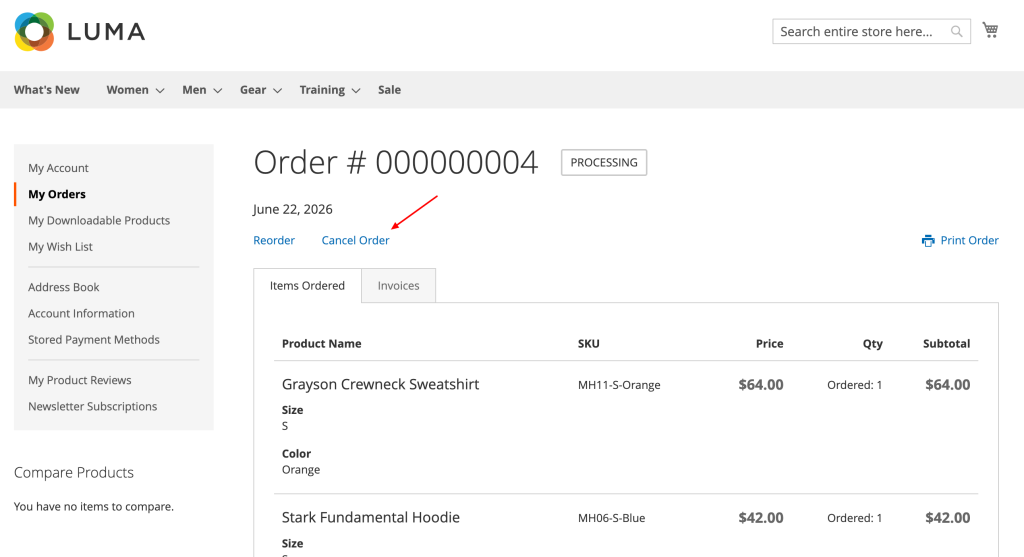
In the detail view of every order (/sales/order/view/): The module is smart enough to check the order status. If it’s in Processing, it slaps a “Cancel Order” button; if it’s already Complete, it magically morphs into “Request Return.” If their time is up and they can no longer return it, a subtle notice pops up at the top of the page so they don’t get their hopes up, and we move on.
For guests: If you access your order info via /sales/guest/form/, you’ll see the exact same information and process.
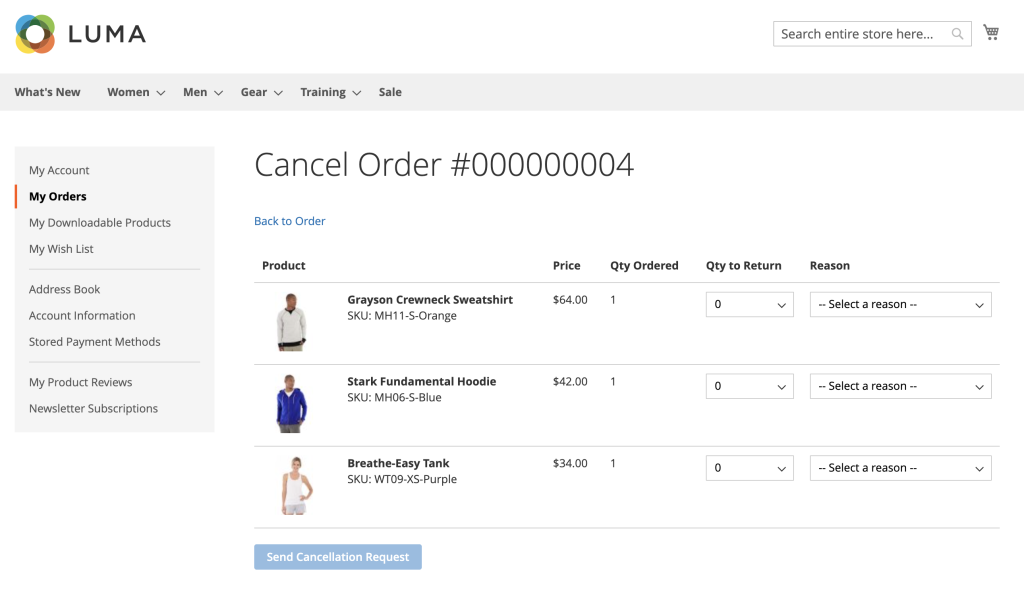
On the selection form, we don’t do infinite blocks of text. When clicking the button, the user lands on a screen listing the items from their order, where they can choose the quantity to return and the reason using a pretty slick dropdown.
When the customer submits the request, they get an email confirmation, and a copy drops right into the store manager’s inbox. This keeps the process looking identical to back when you used to ask customers to just “write you an email.”
🧙♂️ The Backoffice
All this data can’t just vanish into the ether. I’ve built a clean grid under Sales > Return Requests (and yes, I survived yet another medieval torture session configuring Magento’s UI Component XML files) containing everything you need: ID, order number, email, full name, request type (cancellation or return), and statuses. Filterable and sortable, just as God intended.
The Configuration
To top it all off so they don’t come crying to us every time they want to change a comma, everything is manageable from Stores > Configuration: you can toggle the whole module on or off, tweak the withdrawal period days, and pick the email template straight from the Magento editor without touching a single line of production code.
It also lets you inject a custom block right into the screen where the user chooses which products to return. Perfect for laying out the terms clearly or linking to that legal page containing all the boring jargon about what can and cannot be returned.
🤘 Conclusion and a Quick Word of Warning
In the end, what was supposed to be the drama of the quarter turned out to be a well-structured module that doesn’t bloat the frontend, respects community standards, and gives the customer exactly what the law demands without breaking the store’s inventory flow. Legal is happy (as happy as those people can ever be), and I can go back to fighting with OpenSearch indexes in peace.
If you’re drowning in deadlines on your projects, buried under a mountain of work, and you ask me very nicely on socials or in the comments, I might just take a lazy afternoon, clean up a few private routes, push the package to a public repo, and share it so you guys don’t have to reinvent the wheel from scratch. But only if you behave, alright?
Watch those deployments, and remember to flush the cache! 🤘🔥

So, what do you think ?